
HTTPS: Encryption, Certificates and Migration
HTTPS is the encrypted version of HTTP. It ensures nobody between browser and server can read along or alter what is sent. It has not been an optional extra for years: browsers actively mark unencrypted pages as not secure, and without HTTPS modern web features stay locked. This guide covers the technology behind it, what it means for SEO, and how to migrate without losing rankings.
1. HTTPS, SSL and TLS: the terms
The three terms get used interchangeably but mean different things:
- HTTPS is HTTP running over an encrypted connection. The “S” stands for secure.
- SSL (Secure Sockets Layer) is the original encryption protocol. It has been fully retired for years – the last version, SSL 3.0, has been considered broken since 2015.
- TLS (Transport Layer Security) is its successor and what actually runs today. The current versions are TLS 1.2 and TLS 1.3.
Saying “SSL certificate” today technically means a TLS certificate. The old name stuck in product names and everyday speech, which is harmless – what matters is that your server no longer speaks real SSL and has TLS 1.0 and 1.1 switched off too.
TLS delivers three things at once: confidentiality (nobody can read along), integrity (nobody can alter it unnoticed) and authenticity (you really are talking to the server that owns the domain). The third is what the certificate is for – encryption alone would work without it.
2. What the browser shows in the address bar
The fastest way to read a page’s status is the address bar. It knows three states:
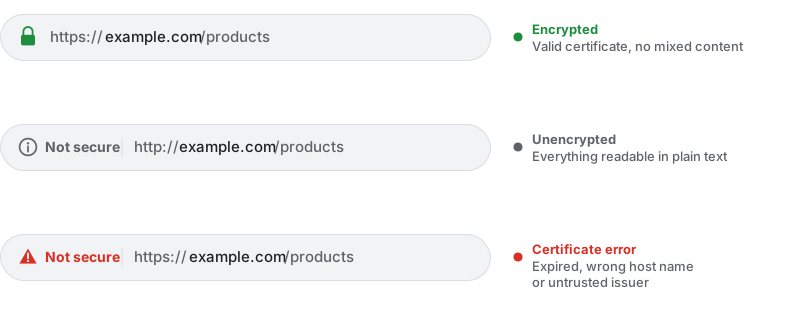
Two details that are widely misread:
- The padlock says nothing about whether a site is trustworthy. It only confirms the connection is encrypted and the certificate matches the domain. A phishing site can hold a perfectly valid certificate. That is exactly why Chrome replaced the padlock with a neutral settings icon in 2023 – to stop it reading as an endorsement.
- “Not secure” on HTTP is not a malware warning, but a statement that the transfer runs in plain text. Every password typed and every order placed is readable to anyone on the same network.
3. How the TLS handshake works
Before the first byte of HTML flows, browser and server negotiate the encryption. On TLS 1.3 that takes a single round trip, which is why performance is barely an argument against HTTPS any more.

Step 3 is the decisive one. The browser checks three things, and each failed check produces its own warning page:
| Check | Question | Typical failure |
|---|---|---|
| Signature chain | Does the certificate come from a trusted authority? | Self-signed, missing intermediate certificate |
| Host name | Is the requested domain listed in the certificate? | Certificate only for example.com, request goes to www.example.com |
| Validity | Is the certificate still valid? | Expired because renewal was not automated |
The missing intermediate certificate is especially treacherous: many browsers have it cached from earlier visits and render the page without complaint, while Googlebot and fresh devices see an error. Always check the chain with an external tool, never only in your own browser.
4. Certificate types: DV, OV and EV
| Type | What is verified | Issuance | Visible difference |
|---|---|---|---|
| DV (Domain Validated) | Control over the domain | Automatic, minutes | None |
| OV (Organization Validated) | Domain plus the company exists | Days, manual | None – only in the certificate details |
| EV (Extended Validation) | Extensive company vetting | Days to weeks | None any more |
EV no longer buys any visible advantage. Until 2019 browsers showed the company name in green next to the address for EV certificates. Chrome and Firefox removed that display because studies showed users ignored it. For SEO all three types are identical: Google does not distinguish between DV, OV and EV.
For the vast majority of sites a free, automatically renewed DV certificate is the right choice. Providers such as Let’s Encrypt issue them with a 90-day lifetime and renew them on their own through the ACME protocol. The short lifetime is a feature, not a drawback: it forces automation, and automated certificates do not expire.
5. HTTPS as a ranking factor
Google made HTTPS an official ranking signal in 2014 – while stressing that it is a lightweight one, affecting fewer than 1% of queries. It acts as a tiebreaker: between two otherwise equal results, the encrypted one wins.
The practically more important effects sit alongside it:
- Trust and conversion. A “Not secure” label in checkout costs measurable completions.
- Referrer data. Moving from HTTPS to HTTP drops the referrer. Traffic from encrypted sites lands in your analytics wrongly filed as “Direct”.
- Modern browser features. Service workers, HTTP/2 and HTTP/3, geolocation and clipboard access all require HTTPS. No HTTPS means no HTTP/2 – and therefore a handicap on Core Web Vitals.
- No third-party injection. Over HTTP, network operators can inject ads or scripts into your pages. Over HTTPS that is impossible.
6. Mixed content: the most common migration mistake
Mixed content happens when a page served over HTTPS pulls individual resources over HTTP. The browser treats active and passive content differently:

| Kind | Examples | Browser behaviour |
|---|---|---|
| Active content | Scripts, stylesheets, iframes, fonts, XHR | Blocked – features silently break |
| Passive content | Images, audio, video | Upgraded to HTTPS, blocked if that fails |
The damage is rarely obvious: a blocked script can take down the shopping cart without any visible error. After every migration, check the console across all page types – home, category, product, checkout and form pages.
Common sources: hard-coded http:// URLs in the database, embedded videos and maps, ad and
tracking scripts, and old CMS content. The quickest remedy is a search-and-replace across the database plus
the header Content-Security-Policy: upgrade-insecure-requests as a safety net.
7. HSTS: enforcing HTTPS
Even with a clean redirect the very first request goes over HTTP: typing example.com sends an
unencrypted request that is then redirected to HTTPS with a
301. That single request is the attackable one.
HTTP Strict Transport Security closes the gap. The header tells the browser to address the domain exclusively over HTTPS from now on:
| Directive | Meaning |
|---|---|
max-age |
Lifetime in seconds; 31536000 (one year) is common |
includeSubDomains |
Applies to all subdomains as well |
preload |
Inclusion in the list hard-coded into browsers |
Careful with preload: the preload list is compiled into the browsers
themselves. Getting listed is effectively irreversible in the short term – removal takes months to
reach users through browser updates. Only set preload once HTTPS works permanently and
without gaps on the domain and all its subdomains.
8. Migrating from HTTP to HTTPS
A switch is a domain move in miniature: every URL changes. This order gets you there without losses:
- Install the certificate and test automatic renewal – including every subdomain.
- Update all internal references: links, images, scripts, stylesheets. Prefer absolute
HTTPS URLs or relative paths, never hard-coded
http://addresses. - Set up the 301s: every HTTP URL to its exact HTTPS counterpart, not wholesale to the homepage.
- Switch canonicals to HTTPS – otherwise they keep pointing at the old variant.
- Update the sitemap and robots.txt, including the sitemap reference inside robots.txt.
- Update hreflang annotations, if you have them.
- Add a new Search Console property. HTTPS is a separate property there; a domain property covering all variants is the cleanest option.
- Fix mixed content and check the console on every page type.
- Enable HSTS once everything runs stably.
- Follow up: ask your most important linking sources to update, switch ad and newsletter destinations, and check the analytics property.
Some ranking wobble in the first weeks is normal, because Google has to adopt the new URLs first. The redirects must stay in place permanently – not just for a few months.
9. Common mistakes
- Letting the certificate expire. Without automated renewal this happens sooner or later – and then every visitor meets a warning page.
- Only switching the homepage. Every URL needs its own redirect.
- Redirecting all HTTP URLs to the homepage. Google reads it as a soft 404 and the individual pages’ signals lapse.
- Canonicals still pointing at HTTP. Contradicts the redirect and delays adoption.
- www and non-www not covered. The certificate must contain both names, or visitors get a warning.
- Ignoring mixed content. Features break silently.
- Missing intermediate certificate. Invisible in your own browser, an error for Googlebot.
- Setting HSTS preload too early. Nearly impossible to undo.
- Internal links pointing at the HTTP variant. Every request then runs through a needless redirect – see internal linking.
10. Testing HTTPS
- Command line:
curl -vI https://example.comshows the certificate, the chain and the status code.curl -sI http://example.comconfirms the 301 to HTTPS. - Browser console: mixed-content messages appear there as a warning or error with the exact URL.
- Search Console: URL Inspection shows which variant Google picked as canonical.
- External TLS test: surfaces missing intermediates, outdated protocol versions and weak cipher suites – everything your own browser hides behind its cache.
Pro tip: Rank-O-Saur shows the status code and protocol for every link on the page.
After a migration you can see straight away which internal links still point at http:// and
run through a redirect – exactly the clean-up that most often gets left undone.
11. Checklist
- Valid certificate for every host name in use, including www.
- Automatic renewal set up and successfully tested once.
- Full certificate chain served (intermediate included).
- TLS 1.2 and 1.3 enabled, older versions switched off.
- Every HTTP URL 301s to its HTTPS counterpart.
- Canonicals, sitemap, robots.txt and hreflang switched to HTTPS.
- Internal links point straight at HTTPS, not through a redirect.
- No mixed-content messages on any page type.
- HTTPS property created in Search Console.
- HSTS set;
preloadonly after stable long-term operation.
12. Frequently Asked Questions
Is HTTPS a ranking factor?
Yes, officially since 2014 – but a lightweight signal that according to Google affects fewer than one percent of queries. It works as a tiebreaker between otherwise equal results. The bigger effects are trust, conversion and access to HTTP/2 and modern browser features.
What is the difference between SSL and TLS?
TLS is the successor to SSL. Every SSL version has been retired for years and is considered insecure; what runs today is TLS 1.2 and 1.3. The term “SSL certificate” survived in everyday use, but technically it always means a TLS certificate.
Is a free certificate good enough?
For the vast majority of sites, yes. A free DV certificate encrypts exactly as strongly as an expensive one. Google does not distinguish between DV, OV and EV, and browsers no longer show any visible difference. Automatic renewal matters far more than price.
Is an EV certificate still worth anything?
For SEO, nothing. The former visible benefit – the company name in green next to the address – was removed by Chrome and Firefox in 2019 because users ignored it. An EV certificate can at most make sense for internal compliance reasons.
What is mixed content and why is it a problem?
Mixed content occurs when an HTTPS page loads individual resources over HTTP. Active content such as scripts and stylesheets is blocked by the browser, so features break silently. Passive content such as images is upgraded to HTTPS first and only blocked if that fails.
Will I lose rankings when moving to HTTPS?
Not permanently, if it is done cleanly. Some wobble in the first weeks is normal while Google adopts the new URLs. Losses come from mistakes: bulk redirects to the homepage, canonicals still pointing at HTTP, or individual URLs left without a redirect.
Do I have to enable HSTS?
It is not required, but it is sensible: HSTS closes the gap on the very first request, which
otherwise runs unencrypted through the redirect. Only set the preload option once
HTTPS is permanently stable on the domain and all subdomains – reversing it takes
months.
Why does my browser no longer show a padlock?
Chrome replaced the padlock with a neutral settings icon in 2023. The reason: many users read the padlock as confirmation that a site was trustworthy. It only confirms the connection is encrypted, not that the operator is legitimate.
Read next