
Title Tag SEO: The Complete Guide
The title tag is the highest-leverage line of HTML on your page. It is the single biggest on-page lever you have over two things at once: how relevant Google thinks your page is, and whether a human actually clicks it. Get it right and you win rankings and traffic at the same time. This guide is the complete, practitioner's playbook — from pixel limits and formulas to why Google rewrites titles and how to fix it at scale.
In a hurry? Jump straight to the free SERP Snippet Preview tool to test your title's length and see exactly how it renders in Google.
1. What is a title tag?
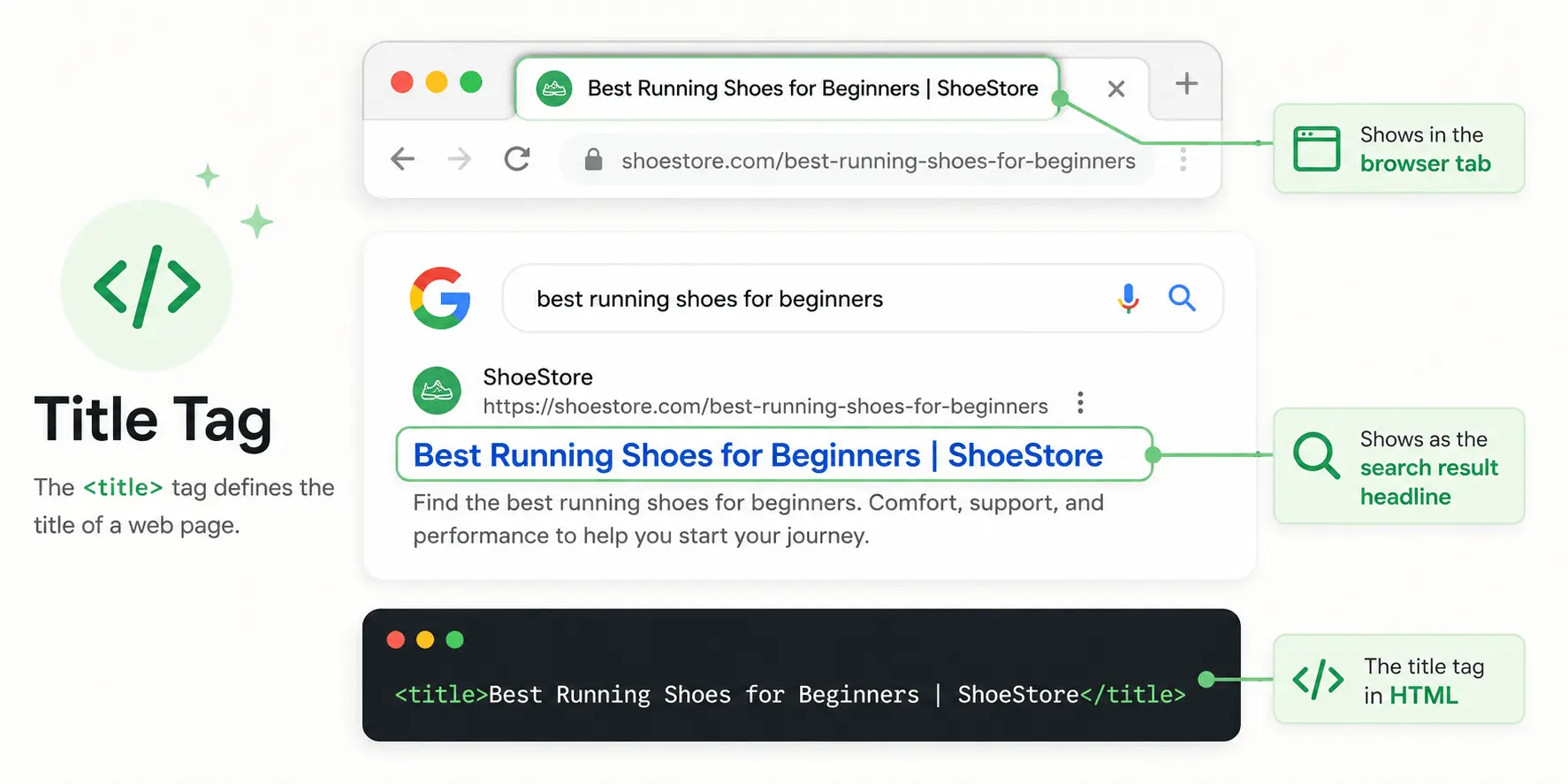
A title tag is an HTML element (<title>) that defines the title of a web page. It does
not appear in the body of the page — instead, it surfaces in the places where users decide whether to
trust and click your page:
- Search results (SERPs): it's the clickable blue headline of your listing — the biggest, most prominent element of the snippet.
- Browser tabs: it labels the open tab, which matters when a user has 20 tabs open.
- Social & messaging shares: platforms fall back to the title tag for the headline of a link preview when no Open Graph title is set.
- Browser bookmarks & history: the saved name defaults to the title tag.
2. Title tag vs. H1: the crucial difference
This is the most common confusion in on-page SEO, so let's settle it. The title tag lives
in the <head> and is what searchers see in Google. The H1 is the
visible headline at the top of the page content itself. They are two different elements with two
different jobs:
- The title tag is written for the SERP — it has to win the click against nine competitors and respect a pixel budget.
- The H1 is written for the visitor who already landed — it can be longer, warmer, or more creative.
They should target the same primary topic, but they do not have to be identical. A product page might use the title "Merino Wool Socks (3-Pack) | Free Shipping – BrandX" while its H1 is simply "Merino Wool Socks". Learn more in our heading structure guide.
3. Why title tags matter for SEO & CTR
Title tags pull double duty, which is why they matter more than almost any other tag:
- Ranking signal: Google uses the words in your title as a strong indicator of topical relevance. A keyword in the title carries more weight than the same word buried in body copy.
- Click-through rate (CTR): even if your position never changes, a sharper title can lift CTR substantially. More clicks on the same ranking means more traffic for free — and sustained CTR can reinforce your position over time.
Think of it this way: rankings get you onto the shelf; the title tag is the packaging that makes someone pick your product off it.
4. HTML code & placement
The title tag must sit inside the <head>, and there must be exactly
one per page:
<!DOCTYPE html>
<html lang="en">
<head>
    <meta charset="UTF-8">
    <title>Best Running Shoes for Beginners (2026) | ShoeStore</title>
    <meta name="description" content="...">
</head>
<body>
    <h1>The 10 Best Running Shoes for Beginners</h1>
</body>
</html>
If your site is JavaScript-rendered, make sure the title is present in the server-rendered HTML or set early — see rendering (SSR vs CSR) for why this matters for crawlers.
5. Optimal length: pixels vs. characters
Here's the detail most guides get wrong: Google does not count characters — it counts pixels. Titles are rendered in a proportional font, so a "W" or "M" consumes far more space than an "i" or "l". Two 60-character titles can behave completely differently.
- Pixel budget: roughly 600 px on desktop and a little more on mobile before truncation.
- Character rule of thumb: 50–60 characters is the safe zone.
- What happens when you exceed it: Google cuts the title and appends an ellipsis
(
…) — or rewrites it entirely (see section 8).
The practical rule: front-load your primary keyword so that even if the tail is truncated, the part that matters is always visible.
6. Anatomy of a high-CTR title
A strong title is built from up to four parts, in this order of priority:
- Primary keyword (front-loaded): the exact phrase you want to rank for, as close to the start as reads naturally.
- Secondary keyword or qualifier: a modifier that captures long-tail intent — "for beginners", "2026", "step-by-step", "free".
- Power word / hook: language that earns the click — "Ultimate", "Proven", "Complete", "Tested" — used honestly, not as clickbait.
- Brand name: appended at the end after a separator (
|or-). On strong brands this lifts CTR; on weak ones it can be dropped to save pixels.
Example: "Title Tag SEO: Length, Examples & Best Practices | Rank-O-Saur" — keyword first, qualifier, hook, brand last.
7. Proven title formulas by page type
Different page types call for different patterns. Reliable starting templates:
- Homepage: Brand – Primary Value Proposition (Category)
- Category / collection: Primary Keyword – Modifier | Brand (e.g. "Men's Running Shoes – Free Shipping | ShoeStore")
- Product: Product Name (Key Attribute) – Benefit | Brand
- Blog / guide: Primary Keyword: Hook (Year) | Brand
- Local / service: Service in City – Benefit | Brand
8. Why Google rewrites titles — and how to prevent it
Since Google's 2021 title update, it routinely replaces title tags in the SERP with text of its own — often pulled from your H1, on-page headings, or anchor text. It does this when your title is:
- Too long and gets truncated awkwardly;
- Keyword-stuffed or repetitive;
- Boilerplate — the same template across thousands of pages;
- Half-empty (just a brand name, or generic like "Home");
- A poor match for the specific query that triggered the result.
How to keep your title intact: stay within the pixel budget, write a unique and accurate title per page, align it with your H1 and the user's search intent, and avoid repetition. You can't force Google to use your title — but a clean, query-relevant one is kept the vast majority of the time.
9. Common mistakes to avoid
- Duplicate titles: every URL needs a unique title, or you invite keyword cannibalisation and confuse Google about which page to rank.
- Missing titles: a page with no title forces Google to guess — usually badly.
- Keyword stuffing:
"Running Shoes, Buy Running Shoes, Cheap Running
                    Shoes"
looks spammy and gets rewritten. - Generic titles: "Home", "Products", "Untitled" give zero relevance signal.
- Intent mismatch: a clickbait title that the content doesn't deliver causes pogo-sticking back to Google and hurts you.
- Burying the keyword: leading with the brand wastes your most valuable pixels.
10. How to audit title tags at scale
On a large site, manual checks don't cut it. A practical workflow:
- Spot-check live with Rank-O-Saur: open any page and instantly see the title, its character and pixel length, and truncation warnings — no crawl required.
- Crawl for duplicates & gaps: a site crawler flags missing, duplicate and over-length titles across every URL.
- Mine Search Console: sort pages by impressions with low CTR — those are your highest-ROI titles to rewrite first.
- Validate before publishing: run new titles through the SERP Snippet Preview so nothing ships truncated.
11. Title tag checklist
- ✓ One unique
<title>per page, inside the<head> - ✓ Under ~600 px / 50–60 characters
- ✓ Primary keyword front-loaded
- ✓ Matches search intent and the page's H1
- ✓ Brand appended at the end (where space allows)
- ✓ No stuffing, no boilerplate, no duplicates
- ✓ Previewed in the SERP tool before publishing
12. Quick reference: title formulas by page type
A reliable title follows a predictable pattern per page type. Front-load the part that distinguishes the page, and let the brand take the tail where space allows.
| Page type | Formula | Example |
|---|---|---|
| Homepage | Brand + core offer | Rank-O-Saur - SEO and GEO Extension for Chrome |
| Category | Primary keyword + qualifier + brand | Running Shoes for Men - Free Returns | Brand |
| Product | Product + key attribute + brand | Trail Runner GTX, Waterproof | Brand |
| Guide or article | Primary keyword + benefit | Title Tag SEO: Length, Examples and Best Practices |
| Local page | Service + location + brand | Emergency Plumber in Bristol | Brand |
13. Frequently asked questions
How long should a title tag be in 2026?
Roughly 50–60 characters, or under ~600 pixels on desktop. Google truncates by pixel width, so front-load your keyword and test the exact rendering in the SERP preview tool.
What's the difference between a title tag and an H1?
The title tag is in the HTML head and shows in search results and browser tabs; the H1 is the visible on-page headline. Same topic, different jobs — the title is optimised for the click, the H1 for the visitor.
Why does Google rewrite my title tags?
Because it judges another source a better match for the query, or because your title is too long, stuffed, boilerplate or empty. Concise, accurate, unique titles are kept far more often (see section 8).
Does every page really need a unique title?
Yes. Duplicate titles cause cannibalisation and weaken relevance. Every indexable URL should have its own descriptive title.
Read next